Open01X Alpha Programme

Use your Yamaha 01X, i88X, Motif ES or 01V96 on a modern computer.

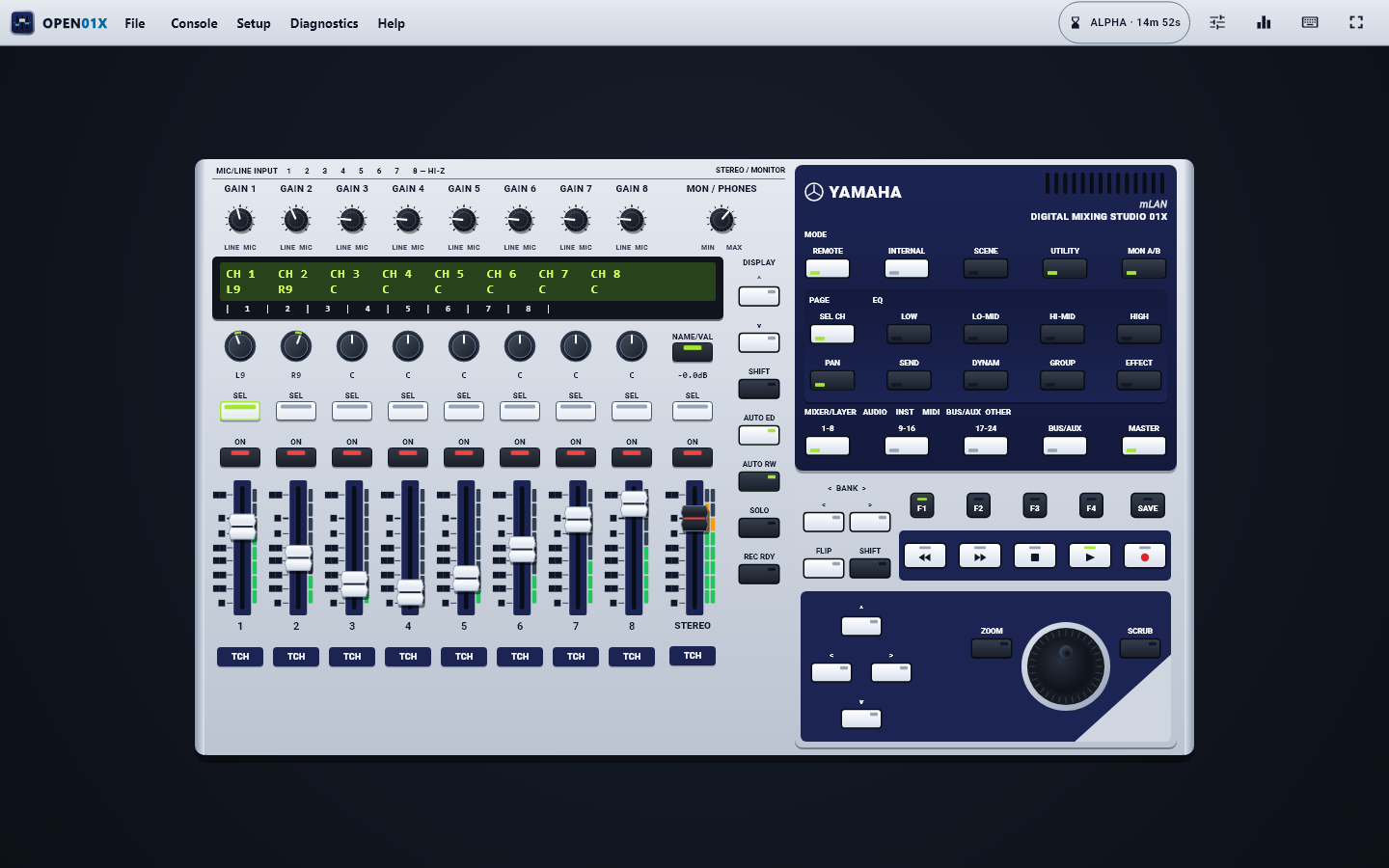
Yamaha stopped updating the original mLAN software years ago, leaving great mixing desks, mic preamps and Motif synthesisers stuck on old computers. Open01X Studio brings back full multitrack audio, MIDI, moving faders and visual cable routing on modern Windows, Mac and Linux machines.

01X / i88X / mLAN16E / MY16-mLAN READY[PATCHBAY] SCENE 01
48 / 96 kHz UP TO 52 LINKED CHANNELS 5 MIDI PORTSWINDOWS, MAC & LINUX
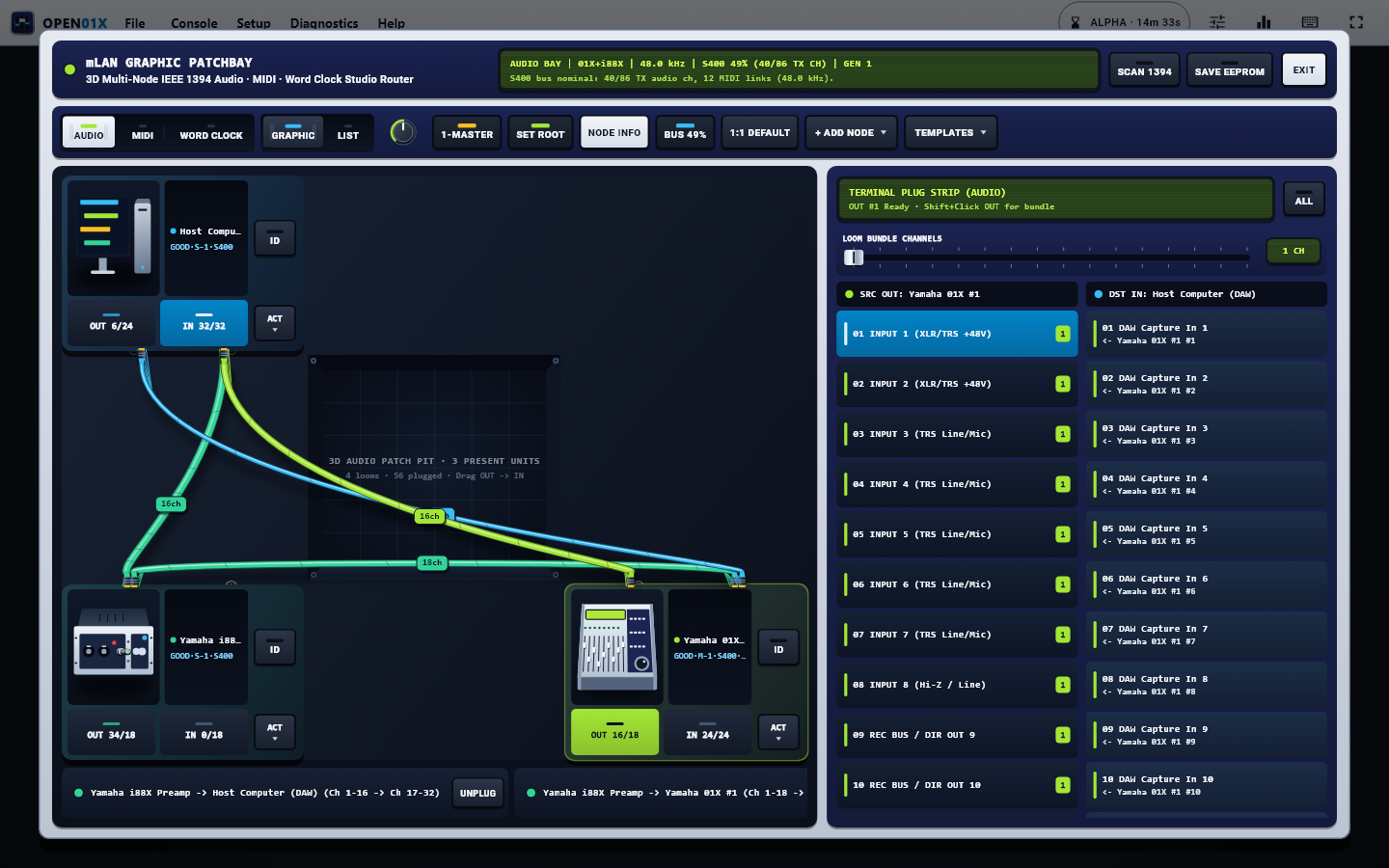
Link Up to 4 Yamaha Units Combine 01X, i88X, Motif ES and 01V96 together in one studio setup
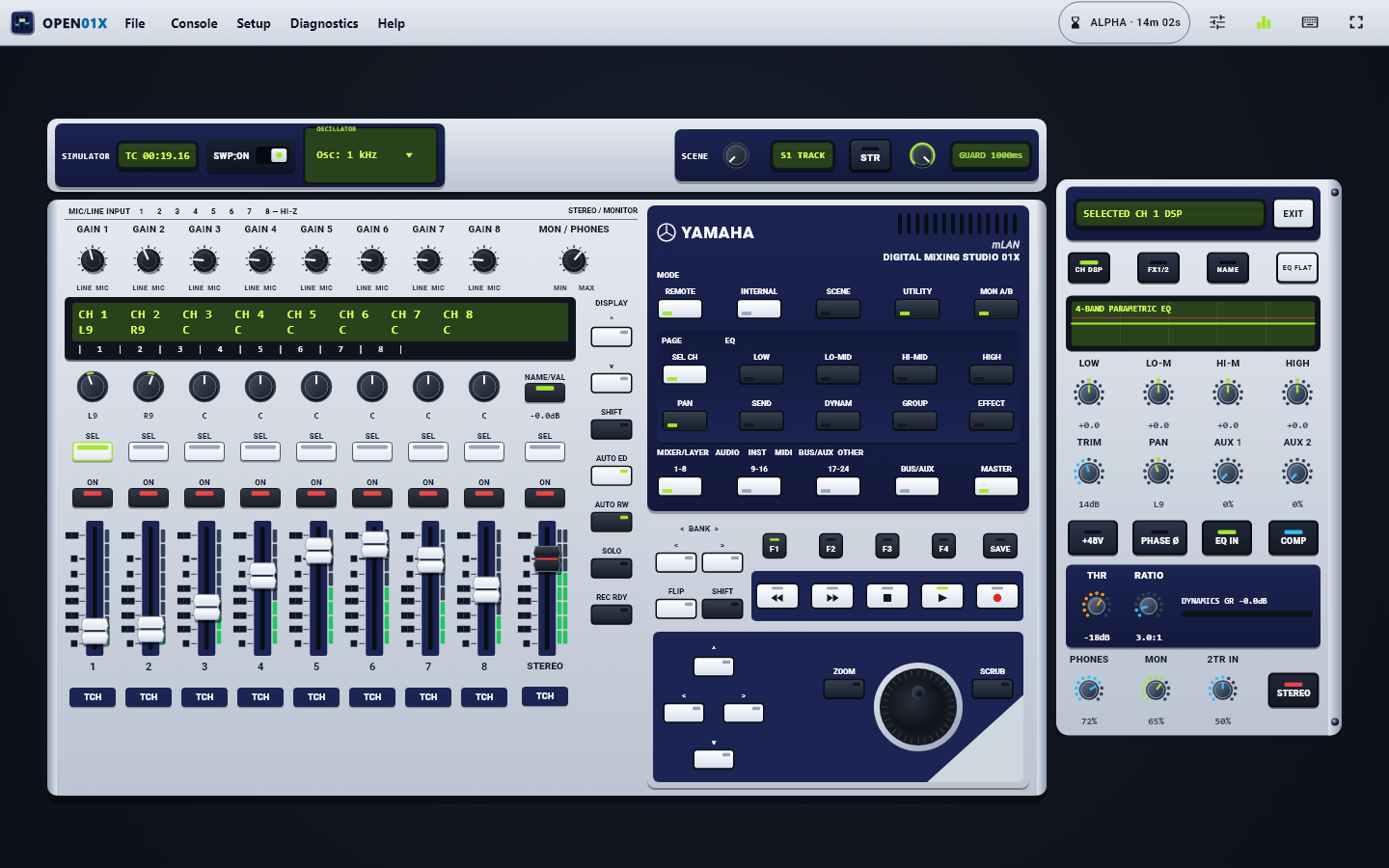
Moving Faders & Effects Custom channel names, tone, compression and onboard reverb & delay
Windows 11, Mac & Linux Direct FireWire cable or simple home network link for newer Macs

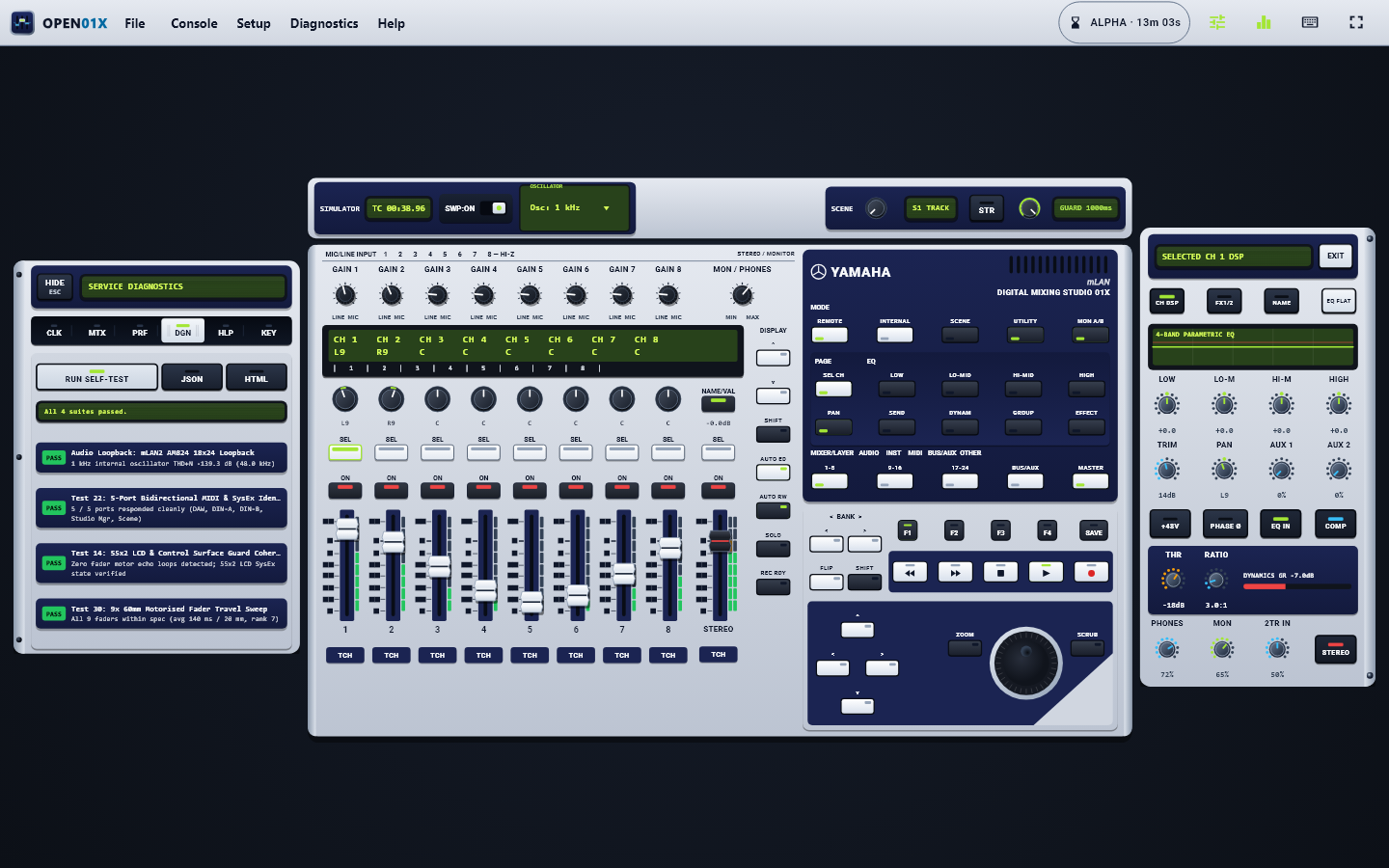
Software Tour

Inside Open01X Studio

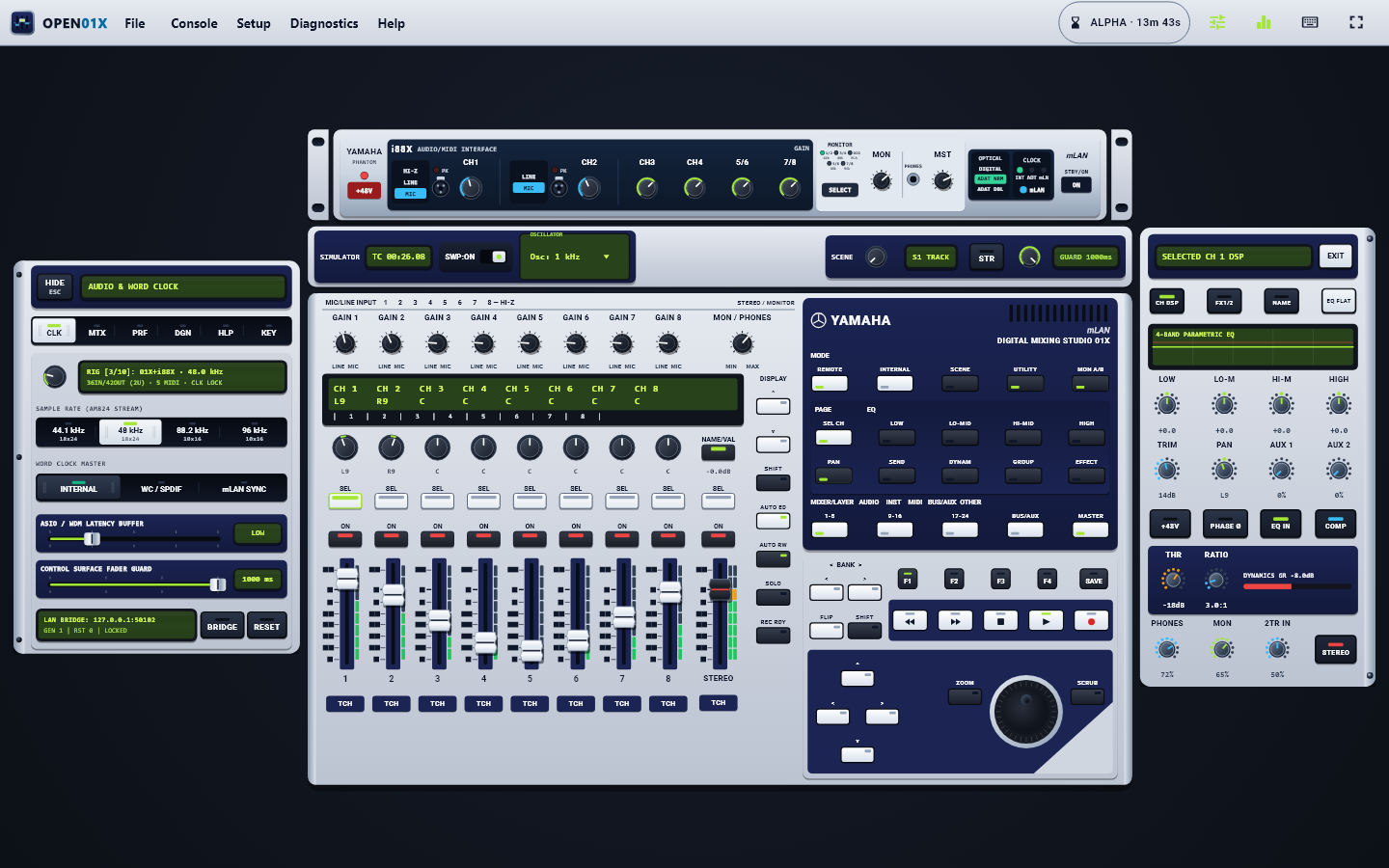
A clear desktop mirror of your Yamaha studio gear with moving faders, visual cable routing across multiple units, channel tone and reverb controls, and quick health checks.

Hardware Compatibility

Supported Yamaha Devices

Open01X Studio brings together Yamaha’s 01X mixer, i88X mic preamps, Motif synthesisers and digital studio consoles into one easy desktop app, visual cable patchbay and Mac network link.

Hardware Model / Expansion Card Device Identifier Audio @ 44.1 / 48 kHz Audio @ 88.2 / 96 kHz MIDI & Control Status
Yamaha 01X
Digital Mixing Studio & Moving Fader Surface
1394\YAMAHA&01X 18 In / 24 Out 10 In / 16 Out 5 MIDI Ports · 9 Moving Faders · Channel Screen Ready to Test
Yamaha i88X
Rackmount Mic Preamp & Optical Converter
1394\YAMAHA&i88X 18 In / 18 Out 14×14 (Optical) or 10×10 (Digital) MIDI Port · Optical Digital · Word Clock Sync Ready to Test
mLAN16E — Motif ES6 / ES7 / ES8, S90ES, Motif-Rack ES
16 Channel Synthesiser Audio & MIDI Card
1394\YAMAHA&mLAN16E 16 In / 8 Out 8 In / 8 Out 3 MIDI Ports · Individual Synth Track Routing Ready to Test
MY16-mLAN — 01V96, DM1000, DM2000, 02R96, DME24N/64N
16 Channel Digital Mixing Console Slot Card
1394\YAMAHA&MY16-mLAN 16 In / 16 Out 8 In / 8 Out 4 MIDI Ports · Replaces Old Studio Manager App Ready to Test
Yamaha n8 / n12, Motif XS / XF (FW16E) & Steinberg MR816 CSX/X
Digital Studio Mixers & FireWire Audio Interfaces
1394\YAMAHA&mLAN16E2 16 In / 16 Out 12 In / 12 Out 2 MIDI Ports · Works on Modern Macs via Network Link Ready to Test
Yamaha mLAN8P / mLAN8E (01V, Motif Classic, CS6x, S80, AW4416)
Classic 8 Channel Audio & MIDI Expansion
1394\YAMAHA&mLAN8P 8 In / 8 Out 4 In / 4 Out 2 MIDI Ports · Standalone Memory Routing Hardware Check
Own any of these Yamaha units or belong to an owners’ group?

Run open01x_bridge --probe-hardware on Windows, Mac or Linux to save a quick hardware summary file and email it to vanillabrand@gmail.com so we can fine tune support for your exact rig.

Join Hardware Alpha

Video Walkthrough

Open01X Studio in action

Take a guided tour through every part of Open01X Studio: moving faders and custom channel names, linking multiple Yamaha units in the visual patchbay, shaping tone and onboard reverb, adjusting the i88X preamp rack and switching studio colour themes.

Setup Guide

How to install and test

Alpha builds use free local test signing on Windows and Mac while we fund official certificates, and each audio session runs for 15 minutes at a time. Please install only on spare test computers — never on your main work machine or on any PC with BitLocker switched on.

01 / WINDOWS SETUP

Windows 10 and 11

Run the .exe Setup Wizard (recommended) or unzip and double click Install_Open01X.bat on a spare test PC without BitLocker.

  1. If Windows asks for administrator permission, click Yes.
  2. Let the Guided Driver Assistant finish. If Secure Boot or Test Mode needs a restart, it walks you through it and finishes automatically afterwards.
  3. Open Open01X Studio from your Desktop shortcut.
02 / MAC SETUP

Mac (Catalina to Sequoia)

Works on Apple Silicon and Intel Macs through a Thunderbolt to FireWire adapter (spare test Macs only).

  1. Open the .pkg installer or double click Install Open01X.command.
  2. Pick Direct FireWire when asked and enter your Mac password once.
  3. Open Open01X Studio and select Yamaha 01X in your recording app.
03 / MAC TAHOE NETWORK

Mac (Tahoe and newer)

Apple removed FireWire support in macOS Tahoe. Plug your 01X into a spare Windows, Linux or older Mac computer instead.

  1. Plug your 01X into the spare computer and run the Open01X assistant there.
  2. Double click Install Open01X.command on your Tahoe Mac, pick Over Network and type the other computer address.
  3. Audio, MIDI and faders run smoothly over a normal home network cable.
04 / GUIDED WIZARD

Guided Wizard and Simulator

Already opened the app? Click Guided Setup on the welcome screen (or in the Setup menu) to check drivers, network links and hardware in three simple steps.

  • No desk connected yet: Pick Virtual Mode to try every fader, rack unit and patchbay cable straight away.
  • Supported gear: Supports Yamaha 01X, i88X, Motif ES / S90ES (mLAN16E), 01V96 / DM1000 / DM2000 / 02R96 (MY16-mLAN), mLAN8P/8E and n8 / n12 / MR816 setups.

What Is New

Latest Alpha release notes

Here is a plain summary of what is included in the newest Alpha test download and how the installer looks after your computer.

Open01X Studio — Latest Alpha Update

Brings the Yamaha 01X, i88X, Motif ES, S90ES, 01V96, DM1000, DM2000, 02R96, n8, n12, MR816 and mLAN8P back to life on modern Windows, Mac and Linux computers, now with multiple unit studio linking and a visual cable patchbay.

Unlock Alpha Downloads
  • Link up to four Yamaha studio units together in one mixer window with live visual cable routing.
  • Give every mixer channel its own custom name, adjust tone and compression, and browse onboard reverb and delay presets.
  • Includes a simple hardware check button so you can confirm your computer sees your mixer before starting a session.
  • Automatically tidies up any older test versions before installing while keeping your saved mixes and channel settings safe.

Each Alpha test session runs for 15 minutes at a time (simply restart the app to carry on testing). The installer automatically removes any older test versions first while keeping your saved settings.

Alpha Access

Sign up and download the Alpha

Enter a few details about your setup below to get a login code and unlock the download for your computer. Signups email vanillabrand@gmail.com so we can help with your test rig.

Alpha Downloads (15 minute builds)

Locked until you register or log in.

Download links for Windows (.exe or .zip), Mac (.tar.gz or .pkg) and Linux setup notes appear here right after you sign up.

Back Open01X

Donate $20.00 towards the full release

Open01X is funded out of pocket right now while we pay for Windows EV driver certificates and Apple code signing. Every contribution goes straight towards finishing the production release.

EARLY SUPPORTER PERKS

First access and full price discount

Our suggested donation is $20.00 USD, processed securely through our verified Stripe checkout (the same Stripe account powering shadowsocial.io).

  • First access: Donors receive first access as soon as the unrestricted production release is ready.
  • Full donation discounted: Whatever you donate now will be discounted directly from the final production release price.
  • Keep track easily: Enter your name and email so we can email your early access link and discount code straight when we launch.

Support

Report a bug or send feedback

Hit a problem on Windows, Mac or inside Open01X Studio? Send a message below or click Help then Report Bug inside the app. Everything goes straight to vanillabrand@gmail.com.